# Automatic login on first page visit
Everytime we restart the application we have to call the /api/login (opens new window) endpoint, to set the token on the backend. It would be better, if the user gets redirected to the login page, if the application has not received a valid token yet. We are going to see in this chapter, how this could be done.
# Backend
First we have to find out what happens, if the user has no token yet.
If we want to access the /api/playlists/tracks (opens new window) endpoint without getting a token first, we receive an empty result back and in the console output of the application we can see Error: Invalid access token.
We can easily find out, that the error stems from the try/catch-block in the method getTracksOfPlaylist from the SpotifyClient class.
We want to change this behaviour and instead return the status code 401, which stands for UNAUTHORIZED.
For this, we first create a new exception type NotLoggedInException and tell it with the @ResponseStatus annotation, that it should be mapped to the HTTP status code 401.
@ResponseStatus(value = HttpStatus.UNAUTHORIZED)
public class NotLoggedInException extends RuntimeException {
    public NotLoggedInException(UnauthorizedException e) {
        super("Unauthorized", e);
    }
}
For throwing this exception, we add another catch-block in the getTracksOfPlaylist, which catches the exception from the wrapper API and maps it to the newly created NotLoggedInException.
@Override
public List<Track> getTracksOfPlaylist(String playlistId) {
    GetPlaylistsTracksRequest getPlaylistRequest = spotifyApi.getPlaylistsTracks(playlistId).build();

    try {
        Paging<PlaylistTrack> paging = getPlaylistRequest.execute();
        return Arrays.stream(paging.getItems())
                .map(PlaylistTrack::getTrack)
                .map(SpotifyClient::map)g
                .collect(toList());
    } catch(UnauthorizedException e) {
        throw new NotLoggedInException(e);
    } catch(IOException | SpotifyWebApiException e) {
        System.err.println("Error: " + e.getMessage());
    }
    return emptyList();
}
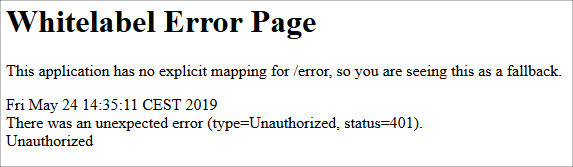
If you restart the application now and then try to access the the /api/playlists/tracks (opens new window) endpoint you should not see the same error as before on the console and the HTTP status code of the request should be 401:
# Frontend
We will create an interceptor that redirects HTTP 401 API errors to the spotifiy login page.
Open a console terminal and issue the following command.
ng generate class unauthorized-interceptorAdd a redirection to the login API if an 401 error occurs.
import {HttpErrorResponse, HttpEvent, HttpHandler, HttpInterceptor, HttpRequest} from '@angular/common/http';
import {Observable, throwError} from 'rxjs';
import {catchError} from 'rxjs/operators';
import {Injectable} from '@angular/core';

@Injectable()
export class UnauthorizedInterceptor implements HttpInterceptor {

  intercept(req: HttpRequest<any>, next: HttpHandler): Observable<HttpEvent<any>> {
    return next.handle(req).pipe(
      catchError((err: HttpErrorResponse) => {
        if (err.status === 401) {
          window.location.href = '/api/login';
        }
        return throwError(err);
      })
    );
  }
}
Next, we need to edit the
app.module.tsfile, so Angular uses the interceptor.
providers: [
    {provide: HTTP_INTERCEPTORS, useClass: UnauthorizedInterceptor, multi: true}
  ],
EXERCISE
- Push your changes to Heroku and test the application.